配置中心git
1.简介
随着线上项目变的日益庞大,每个项目都散落着各种配置文件,如果采用分布式的开发模式,需要的配置文件随着服务增加而不断增多。某一个基础服务信息变更,都会引起一系列的更新和重启,运维苦不堪言也容易出错。配置中心便是解决此类问题的灵丹妙药。
市面上开源的配置中心有很多,BAT每家都出过,360的QConf、淘宝的diamond、百度的disconf都是解决这类问题。国外也有很多开源的配置中心Apache Commons Configuration、owner、cfg4j等等。这些开源的软件以及解决方案都很优秀,但是我最钟爱的却是Spring Cloud Config,因为它功能全面强大,可以无缝的和spring体系相结合,够方便够简单颜值高我喜欢。
2.Spring Cloud Config
2.1 配置中心的核心功能:
1.提供服务端和客户端支持;
2.集中管理各环境的配置文件;
3.配置文件修改之后,可以快速的生效;
4.可以进行版本管理;支持大的并发查询;支持各种语言
2.2 Spring Cloud Config可以完美的支持配置中心所有的需求。
Spring Cloud Config项目是一个解决分布式系统的配置管理方案。
它包含了Client和Server两个部分,server提供配置文件的存储、以接口的形式将配置文件的内容提供出去,client通过接口获取数据、并依据此数据初始化自己的应用。
Spring cloud使用git或svn存放配置文件,默认情况下使用git,我们先以git为例做一套示例。
首先在github上面创建了一个文件夹config-repo用来存放配置文件,为了模拟生产环境,我们创建配置文件: neo-config-dev.properties
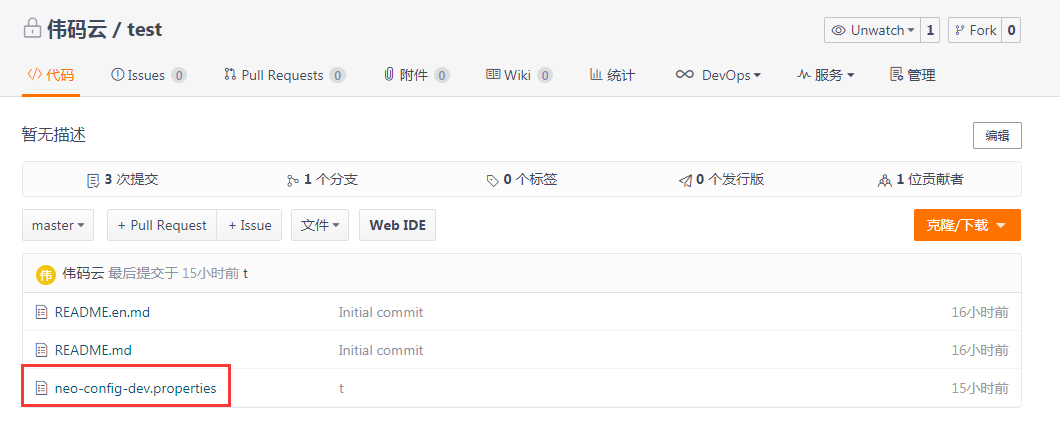
此文件内容:neo.hello: dev .通过git命名,上传文件到码云git管理上,如上图所示。
2.2.1 server端
2.2.1.1 pom.xml
<parent>
    <groupId>org.springframework.boot</groupId>
    <artifactId>spring-boot-starter-parent</artifactId>
    <version>1.5.3.RELEASE</version>
</parent>
  <properties>
      <project.build.sourceEncoding>UTF-8</project.build.sourceEncoding>
    <project.reporting.outputEncoding>UTF-8</project.reporting.outputEncoding>
    <java.version>1.8</java.version>
</properties>

<dependencies>
    <dependency>
        <groupId>org.springframework.boot</groupId>
        <artifactId>spring-boot-starter</artifactId>
    </dependency>
    <dependency>
        <groupId>org.springframework.boot</groupId>
        <artifactId>spring-boot-starter-test</artifactId>
        <scope>test</scope>
    </dependency>

    <!-- https://mvnrepository.com/artifact/org.springframework.cloud/spring-cloud-config-server -->
    <dependency>
        <groupId>org.springframework.cloud</groupId>
        <artifactId>spring-cloud-config-server</artifactId>
        <version>1.3.4.RELEASE</version>
    </dependency>

</dependencies>
<build>
    <plugins>
        <plugin>
            <groupId>org.springframework.boot</groupId>
            <artifactId>spring-boot-maven-plugin</artifactId>
        </plugin>
    </plugins>
</build>
<!--注意:这里必须要添加,否则各种依赖有问题-->
<repositories>
    <repository>
        <id>spring-milestones</id>
        <name>Spring Milestones</name>
        <url>https://repo.spring.io/libs-milestone</url>
        <snapshots>
            <enabled>false</enabled>
        </snapshots>
    </repository>
</repositories>
2.2.1.2 application.yml
server:
  port: 8005

spring:
  application:
    name: server-config
  cloud:
    config:
      server:
        git:
          uri: https://gitee.com/mayunchenwei/test.git  #git仓库地址
          username: 17809213302@163.com
          password: chenwei0307
2.2.1.3 main方法启动
@SpringBootApplication
@EnableConfigServer
public class ServerConfigRun {
    public static void main(String[] args) {
        SpringApplication.run(ServerConfigRun.class, args);
    }
}
2.2.1.4 测试:
直接查看 文件内容:http://localhost:8005/neo-config-dev.properties
2.2.1.5 git仓库的配置文件会转换成web接口,规则如下
仓库中的配置文件会被转换成web接口,访问可以参照以下的规则:
/{application}/{profile}[/{label}]
/{application}-{profile}.yml
/{label}/{application}-{profile}.yml
/{application}-{profile}.properties
/{label}/{application}-{profile}.properties
以neo-config-dev.properties为例,它的application是neo-config,profile是dev2.2.2 client端
主要展示如何在业务项目中去获取server端的配置信息
2.2.2.1 pom.xml
<parent>
    <groupId>org.springframework.boot</groupId>
    <artifactId>spring-boot-starter-parent</artifactId>
    <version>1.5.3.RELEASE</version>
</parent>
  <properties>
      <project.build.sourceEncoding>UTF-8</project.build.sourceEncoding>
    <project.reporting.outputEncoding>UTF-8</project.reporting.outputEncoding>
    <java.version>1.8</java.version>
</properties>

<dependencies>
       <dependency>
        <groupId>org.springframework.cloud</groupId>
        <artifactId>spring-cloud-starter-config</artifactId>
        <version>1.3.4.RELEASE</version>
    </dependency>
    <dependency>
        <groupId>org.springframework.boot</groupId>
        <artifactId>spring-boot-starter-web</artifactId>
    </dependency>
    <dependency>
        <groupId>org.springframework.boot</groupId>
        <artifactId>spring-boot-starter-test</artifactId>
        <scope>test</scope>
    </dependency>
</dependencies>
<build>
    <plugins>
        <plugin>
            <groupId>org.springframework.boot</groupId>
            <artifactId>spring-boot-maven-plugin</artifactId>
        </plugin>
    </plugins>
</build>
<!--注意:这里必须要添加,否则各种依赖有问题-->
<repositories>
    <repository>
        <id>spring-milestones</id>
        <name>Spring Milestones</name>
        <url>https://repo.spring.io/libs-milestone</url>
        <snapshots>
            <enabled>false</enabled>
        </snapshots>
    </repository>
</repositories>
2.2.2.2 application.yml
spring:
  application:
    name: client-config

server:
  port: 8006
2.2.2.3 bootstrap.yml
spring:
  cloud:
    config:
      name: neo-config
      profile: dev
      uri: http://localhost:8005
2.2.2.4 文件加载顺序特别说明
spring.application.name:对应{application}部分
spring.cloud.config.profile:对应{profile}部分
spring.cloud.config.label:对应git的分支。如果配置中心使用的是本地存储,则该参数无用
spring.cloud.config.uri:配置中心的具体地址
spring.cloud.config.discovery.service-id:指定配置中心的service-id,便于扩展为高可用配置集群。
特别注意:上面这些与spring-cloud相关的属性必须配置在bootstrap.properties中,config部分内容才能被正确加载。因为config的相关配置会先于application.properties,而bootstrap.properties的加载也是先于application.properties
2.2.2.5 main 启动类
@SpringBootApplication
public class ClientConfigRun {
    public static void main(String[] args) {
        SpringApplication.run(ClientConfigRun.class, args);
    }
}
2.2.2.6 controller
@RestController
public class HelloController {
    @Value(value="${neo.hello}")
    private String hello;
    @RequestMapping("/helloTest")
    public String getHello(){
        return this.hello;
    }
}
2.2.2.7 访问测试
启动客户端访问 http://127.0.0.1:8006/helloTest
页面显示dev ,
(实际上取到的是git上的neo-config-dev.properties文件的内容)。
2.2.2.8 出现的问题
手动修改neo-config-dev.properties中配置信息为:neo.hello= dev is updata
提交到github,再次在浏览器访问http://127.0.0.1:8006/helloTest,返回:neo.hello: dev ,说明获取的信息还是旧的参数,这是为什么呢?因为springboot项目只有在启动的时候才会获取配置文件的值,修改github信息后,client端并没有在次去获取,所以导致这个问题
2.2.2.9 解决问题方法
借用refresh 技术,来解决不刷新的问题。
##2.2.3 refresh 优化
Spring Cloud Config分服务端和客户端,服务端负责将git(svn)中存储的配置文件发布成REST接口,客户端可以从服务端REST接口获取配置。但客户端并不能主动感知到配置的变化,从而主动去获取新的配置。客户端如何去主动获取新的配置信息呢,springcloud已经给我们提供了解决方案,每个客户端通过POST方法触发各自的/refresh
注意:客户端修改如下,未修改程序参考2.2.2 client端
2.2.3.1 pom.xml
<parent>
    <groupId>org.springframework.boot</groupId>
    <artifactId>spring-boot-starter-parent</artifactId>
    <version>1.5.3.RELEASE</version>
</parent>
  <properties>
      <project.build.sourceEncoding>UTF-8</project.build.sourceEncoding>
    <project.reporting.outputEncoding>UTF-8</project.reporting.outputEncoding>
    <java.version>1.8</java.version>
</properties>

<dependencies>
       <dependency>
        <groupId>org.springframework.cloud</groupId>
        <artifactId>spring-cloud-starter-config</artifactId>
        <version>1.3.4.RELEASE</version>
    </dependency>
    <dependency>
        <groupId>org.springframework.boot</groupId>
        <artifactId>spring-boot-starter-web</artifactId>
    </dependency>
    <dependency>
        <groupId>org.springframework.boot</groupId>
        <artifactId>spring-boot-starter-test</artifactId>
        <scope>test</scope>
    </dependency>
    <!-- 监控程序在运行时的状态,包括refresh功能 -->
    <dependency>
      <groupId>org.springframework.boot</groupId>
      <artifactId>spring-boot-starter-actuator</artifactId>
    </dependency>
</dependencies>
<build>
    <plugins>
        <plugin>
            <groupId>org.springframework.boot</groupId>
            <artifactId>spring-boot-maven-plugin</artifactId>
        </plugin>
    </plugins>
</build>
<!--注意:这里必须要添加,否则各种依赖有问题-->
<repositories>
    <repository>
        <id>spring-milestones</id>
        <name>Spring Milestones</name>
        <url>https://repo.spring.io/libs-milestone</url>
        <snapshots>
            <enabled>false</enabled>
        </snapshots>
    </repository>
</repositories>
2.2.3.2 controller
@RestController
@RefreshScope //使用该注解的类,会在接收springcloud配置中心配置刷新时,自动将新的配置更新到该类的对应的字段
public class HelloController {
    @Value(value="${neo.hello}")
    private String hello;


    @RequestMapping("/helloTest")
    public String getHello(){
        return this.hello;
    }
}
2.2.3.3 访问测试
浏览器访问http://127.0.0.1:8006/helloTest,
返回:neo.hello: dev is updata ,由此可解决 2.2.2.8出现的问题。
文章标题:配置中心git
发布时间:2019-11-13, 16:58:00
最后更新:2019-11-13, 16:58:00